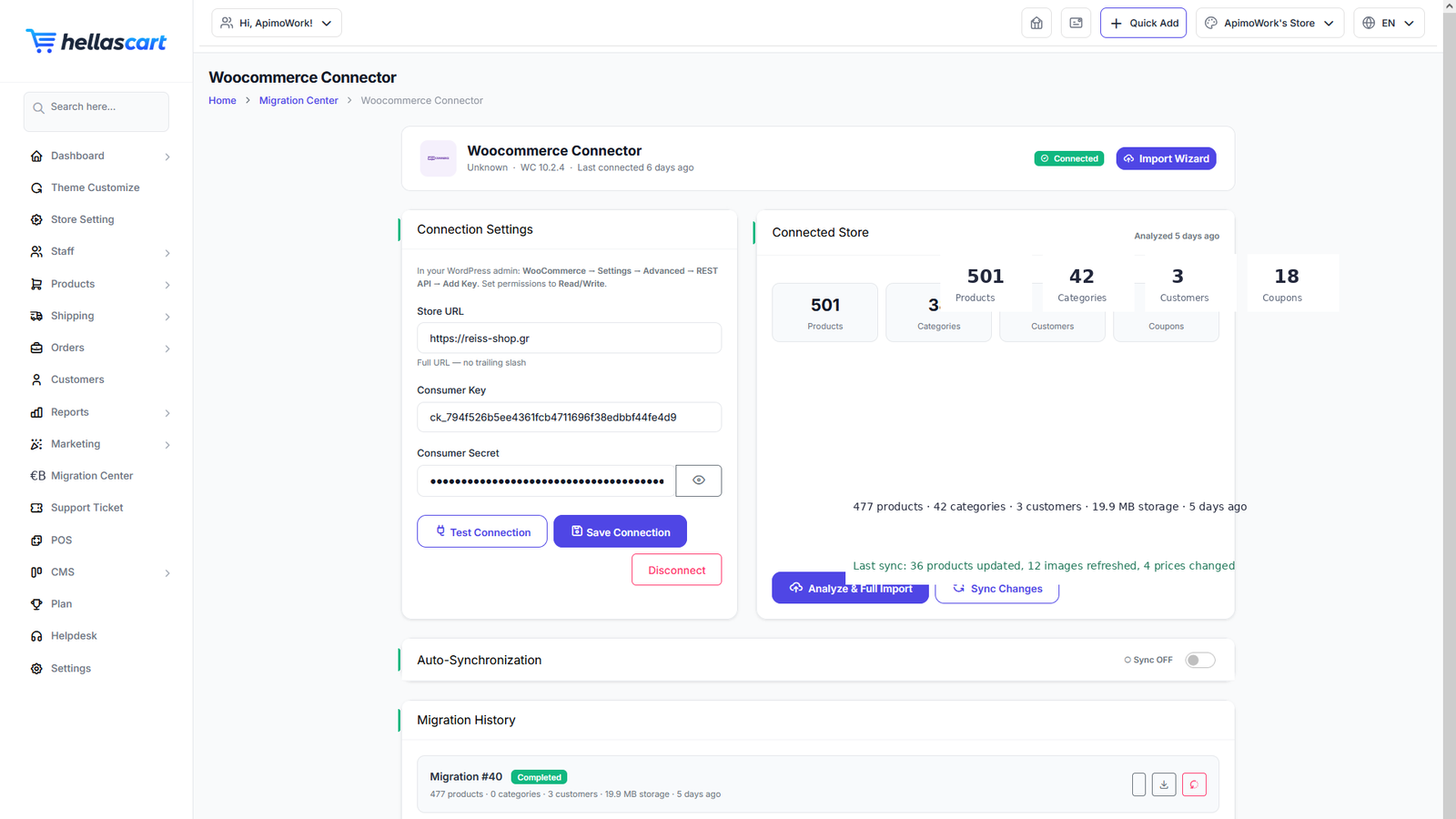
The Migration Center brings an existing shop into HellasCart. Today it imports from WooCommerce, with more platforms planned. It appears in the sidebar after you enable WooCommerce in Settings.
Prepare the connection
- Enable WooCommerce under Settings.
- Open Migration Center → WooCommerce.
- Enter your WooCommerce site URL and API keys.
- Click Test Connection and wait for the success message.
WarningUse read keys and double-check the store URL before importing. A wrong URL can connect to the wrong shop.
Run the migration
- Click Analyze to see what will be imported.
- Review the counts of products, categories, customers and coupons.
- Click Start and watch the progress bar and log.
TipImport during quiet hours — large stores take time. You can follow progress live and download the log afterwards.
Verify the imported data
- Open Products and spot-check several items and their images.
- Check Categories and Customers.
- If something is wrong, use Rollback and try again.
Best PracticeVerify a handful of products fully — price, images and stock — before going live. The Connector manages saved connections per platform, and new import sources are added over time.